 By Yuval Strutti
![How to Create AI Avatar Video [Step-by-Step Guide]](/_next/image?url=%2Fblog%2Fimages%2F68f8e12f9a77f1fdf4a3548f_ZYUz87zUmZNbDspsYOxW61jo.webp&w=3840&q=75&dpl=dpl_51TBxyqS9ifcYCNZoNXwLz1PPrbQ)
AI avatar videos let teams produce presenter-style content without cameras, studios, or repeated filming sessions. With a script and the right platform, you can generate a complete talking-head video in minutes.
What is an AI avatar video?
An AI avatar video uses a synthetic presenter that looks and sounds human to deliver your script. It is commonly used for explainers, product demos, training, and social media clips.
4 types of AI avatar videos
1) Talking presenter videos
Best for intros, announcements, and direct educational communication.
2) Product and demo videos
Combine avatar narration with product footage or screen walkthroughs.
3) Training videos
Used for onboarding, HR content, and repeatable internal learning modules.
4) Social media clips
Short vertical formats for Instagram, TikTok, and YouTube Shorts with captions and fast pacing.
7 steps to create an AI avatar video
Step 1: Choose the platform
Prioritize voice realism, motion quality, editing flexibility, and ownership rights. Solara AI, Synthesia, HeyGen, and Elai are common options.
Step 2: Write the script
- Use short sentences
- Write like you speak
- Read aloud and simplify awkward phrasing
- Avoid jargon where possible
- Match tone to objective (ad, tutorial, explainer)
Prompt idea: Write a 30-second video ad script for [product], conversational tone, end with a clear call to action.
Step 3: Select avatar and voice
Choose a presenter style that matches audience expectations. Custom avatars feel more personal; stock avatars are faster to deploy.
Step 4: Add visuals and brand elements
Keep background and overlays clean. Add logos, product cutaways, and text callouts that support the spoken message.
Step 5: Fine-tune tone and pacing
Adjust speed, pauses, and delivery emphasis until narration sounds natural and clear.
Step 6: Preview and edit
Check lip sync, pronunciation, transition timing, and caption readability before final render.
Step 7: Export and publish
Export in channel-ready ratios and resolutions, then publish or schedule directly where supported.
Tips to make avatar videos look natural
- Keep sentence structure simple
- Use punctuation to shape natural pauses
- Frame presenters cleanly with minimal background noise
- Add subtle motion and captions to maintain attention
Best AI tools in 2025
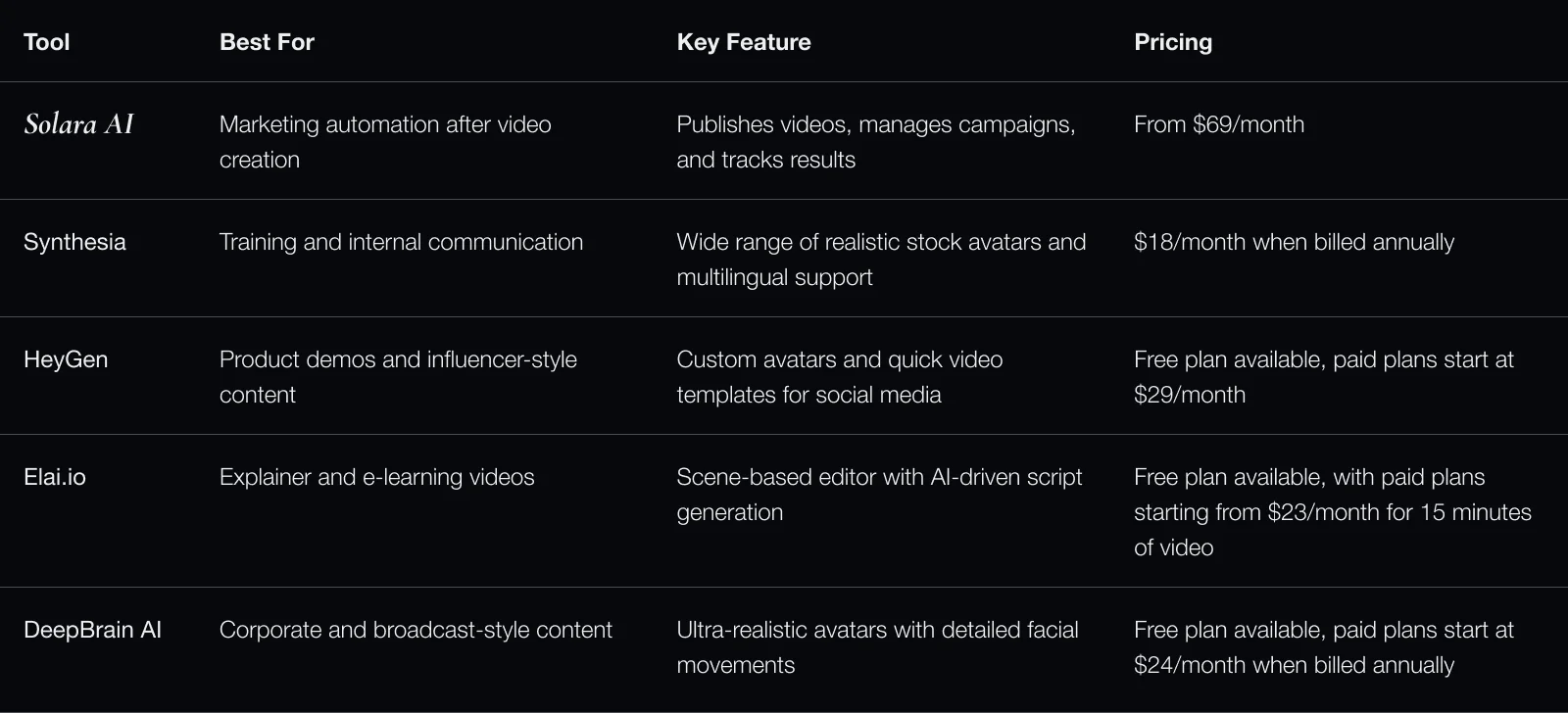
- Solara AI
- Synthesia
- HeyGen
- D-ID
- Elai
Using Solara AI after creation
Beyond video generation, Solara AI can adapt creatives for channel specs, schedule publishing, monitor outcomes, and optimize future campaign iterations.
FAQs
- Can I use my own face? Yes, many tools support custom avatars using image/video input and consent steps.
- Are avatar videos good for ads? Yes, especially when scripts are concise and platform-specific.
- How long does production take? Often minutes after script and assets are prepared.
- Do I need editing skills? Usually no; most tools provide guided generation and lightweight editing.