
Video editing MCP server for Claude, ChatGPT and Cursor
Solara AI's video editing MCP server lets Claude, ChatGPT and Cursor edit your recordings and ask to post them.
https:/Claude, ChatGPT, Cursor or another AI agent sends your recording to Solara AI, which edits it into a short for Instagram, TikTok, Facebook, LinkedIn, YouTube and X.









See it in action
Shown with Claude: any MCP agent calls the same tools.
Connect your agent in 3 steps
Add Solara
In your terminal, add Solara for every project:
claude mcp add --transport http --scope user solara https:// api. solaraai. com/ mcp Sign in
Run this, or type /mcp in Claude Code and pick solara:
claude mcp login solaraChoose Allow
Your browser opens Solara: sign in, check what it asks for, and choose Allow.
The command adds Solara to all your projects, not only this one.
Then ask: “Edit my latest recording in the Brass style and post it Tuesday on Instagram.”
See the Claude Code guideAdd Solara to mcp.json
Open ~/.cursor/mcp.json and add Solara under mcpServers:
"solara": { "url": "https:// api. solaraai. com/ mcp" } Find it in Cursor
Open Cursor’s MCP settings on its Customize page: Solara is listed and asks you to sign in.
Choose Allow
Your browser opens Solara: sign in, check what it asks for, and choose Allow.
~/.cursor/mcp.json adds Solara to every project; a project’s own .cursor/mcp.json adds it to that one.
Then ask: “Edit my latest recording in the Brass style and post it Tuesday on Instagram.”
See the Cursor guideOpen Claude settings
Open the Claude app or claude.ai and go to
Add the Solara AI connector
Name it Solara AI and paste the URL:
https:// api. solaraai. com/ mcp Connect and turn it on
Click Add and Connect, sign in to Solara and choose Allow. Then in a chat, click +, then Connectors, and switch Solara AI on.
Works on every Claude plan, Free included (one custom connector).
Then ask: “Edit my latest recording in the Brass style and post it Tuesday on Instagram.”
See the Claude guideOpen ChatGPT’s plugins
On the web, open ChatGPT’s plugins page and select +, then Add custom MCP server.
Add the Solara AI server
Name it Solara AI and paste the URL under Connection:
https:// api. solaraai. com/ mcp Sign in and allow it
Set sign-in to OAuth, check I understand and want to continue and choose Create as a plugin. Sign in to Solara and choose Allow.
ChatGPT edits and posts only on its Business, Enterprise and Edu plans, on the web; in a Business workspace, an admin or owner adds it. In a chat, type @ and pick Solara AI.
Then ask: “Edit my latest recording in the Brass style and post it Tuesday on Instagram.”
See the ChatGPT guideAsk your Bot to add Solara
In a chat with your Bot, send:
Add this MCP server: https:// api. solaraai. com/ mcp Confirm
Your Bot shows the details and asks you to confirm: answer “Yes, add it”.
Connect
Choose Connect on the card in the chat, sign in to Solara and choose Allow.
Your Bot works in the cloud, not on your computer: paste a public link to your recording, and Solara fetches it.
Then ask: “Edit my latest recording in the Brass style and post it Tuesday on Instagram.”
See the Grok Bot guideRun login
Nothing to install (Node.js 20 or newer). It shows you where to get your key, then checks it.
npx solaraai loginCreate a key
In Solara, create one under API keys in the menu under your name, and give it to the CLI as SOLARA_API_KEY, never in a chat.
Check it
Run login again to check the key, then see every command:
npx solaraai --help
The CLI makes, edits and exports videos; it never posts.
Then ask: “Edit my latest recording in the Brass style and export it.”
See the API keys guideAdd Solara
Run this in your terminal:
openclaw mcp add solara --url https:// api. solaraai. com/ mcp --transport streamable-http --auth oauth Sign in
Run this, open the link it prints, sign in to Solara and choose Allow:
openclaw mcp login solaraCheck it
Ask OpenClaw: “List the video styles I can use in Solara.”
If OpenClaw’s Gateway is running, stop it first (openclaw gateway stop), then start it again.
Then ask: “Edit my latest recording in the Brass style and post it Tuesday on Instagram.”
See the OpenClaw guideAdd Solara to your config
Add this to ~/.hermes/config.yaml:
mcp_servers: solara: url: "https://api.solaraai.com/mcp" auth: oauthSign in
Run this, sign in to Solara and choose Allow:
hermes mcp login solaraCheck it
Run hermes and ask: “List the video styles I can use in Solara.” Already running? Type /reload-mcp first.
If the file already has an mcp_servers section, add only the solara entry to it.
Then ask: “Edit my latest recording in the Brass style and post it Tuesday on Instagram.”
See the Hermes guideOpen your agent’s MCP settings
Find where your agent adds a remote MCP server.
Add Solara’s address
Paste the URL:
https:// api. solaraai. com/ mcp Sign in to Solara and choose Allow
Your agent opens Solara: sign in, check what it asks for, and choose Allow.
Works with opencode and any agent that can use a remote MCP server.
Then ask: “Edit my latest recording in the Brass style and post it Tuesday on Instagram.”
See how connecting worksAsk for it in plain words
Four requests that work today.
Edit a recording
Turn this recording into a Reel in the Brass style: drive.google.com/…
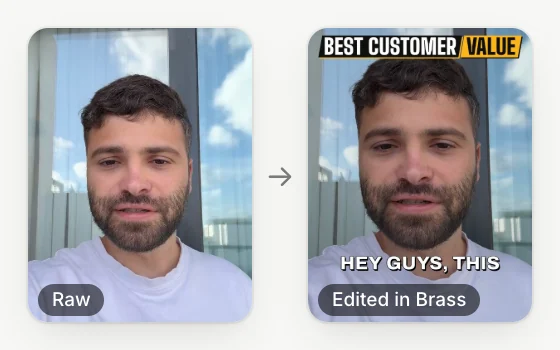
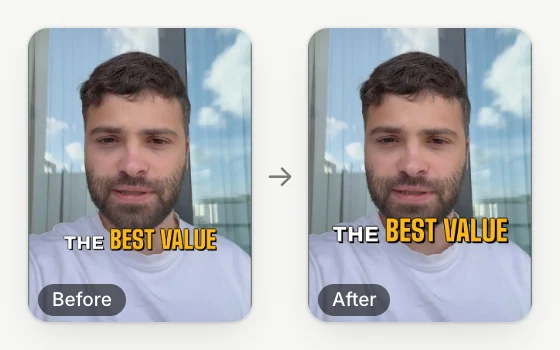
Fix the details
Make the captions bigger, add music and fix how my name is spelled.
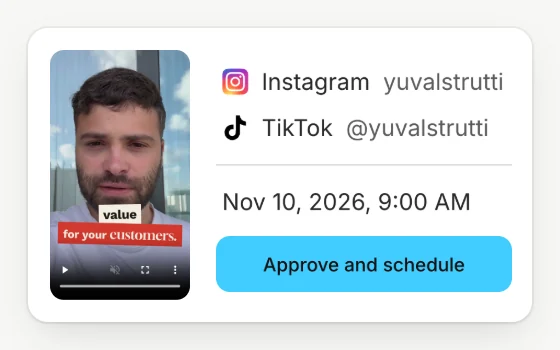
Schedule it
Export it, write a caption and schedule it for Instagram and TikTok on Tuesday at 9 AM.
Post it again
Post it again on Thursday on LinkedIn, with a longer caption for LinkedIn.
 Tue 10 · 9:00 AM

 Thu 12 · 9:00 AM
 Longer caption


Which agents can upload files?
Claude Code, Cursor, opencode and Claude Desktop sessions that can open your files upload the file itself. ChatGPT, claude.ai in your browser and Grok Bot can’t: paste a public link, such as a Google Drive or Dropbox share link, and Solara fetches it.
Common questions
What is a video editing MCP server?
An MCP server that gives an AI agent video editing tools. Solara AI's, at https://api.solaraai.com/mcp, lets Claude, ChatGPT, Cursor and other agents edit your recordings, export them and ask to post them.
Which tools does the Solara AI MCP server give my agent?
One for each step of a video. You ask in plain words and your agent picks the tool: it takes your recording, edits it, changes what you ask, exports it, asks you to post it and shows your week. Their names:
upload_from_urltakes the recordingcreate_videoedits itapply_editchanges itexport_videoexports itprepare_publishasks you to post it, and you approve your agent's post in Solaralist_scheduled_postsshows the week
Which AI apps can connect?
Any AI agent that can use a remote MCP server. There are step-by-step guides for Claude, ChatGPT, Claude Code, Cursor, Grok Bot, OpenClaw, Hermes Agent and opencode, and agents that run commands can use Solara’s command-line tool. ChatGPT edits and posts only on its Business, Enterprise and Edu plans, on the web; on Pro it can only read, and OpenAI doesn’t list Plus or Free. Claude works on every Claude plan.
Do I need an API key?
No. Your agent signs in to Solara and you choose Allow, so there’s no key to copy. API keys are for servers and automations: create one in Solara from the menu under your name, then API keys. A key can export but can’t post.
Can my agent post without me?
No, it can only ask: you approve every post your agent asks for, in Solara. You choose what it may do, see every change, can disconnect it any time, and it sees only your workspace.
Is it free?
AI agents work on every plan, within its limits. On the free try your first download is free; posting a video Solara edited comes with a plan. On the free try that’s 3 videos, clips up to 90 seconds. Connecting an agent costs nothing extra, each export uses one of your plan’s videos as it does in the app, and what your agent starts each day is capped.
Turn your phone videos into customers

- 3 videos free
- No credit card required
Posts to Instagram, TikTok, Facebook, LinkedIn, YouTube and X