Comparison · prices read 28 September 2026
An Opus Clip alternative, when there is no long video
 By Yuval StruttiFounder, Solara AICompetitor prices checked
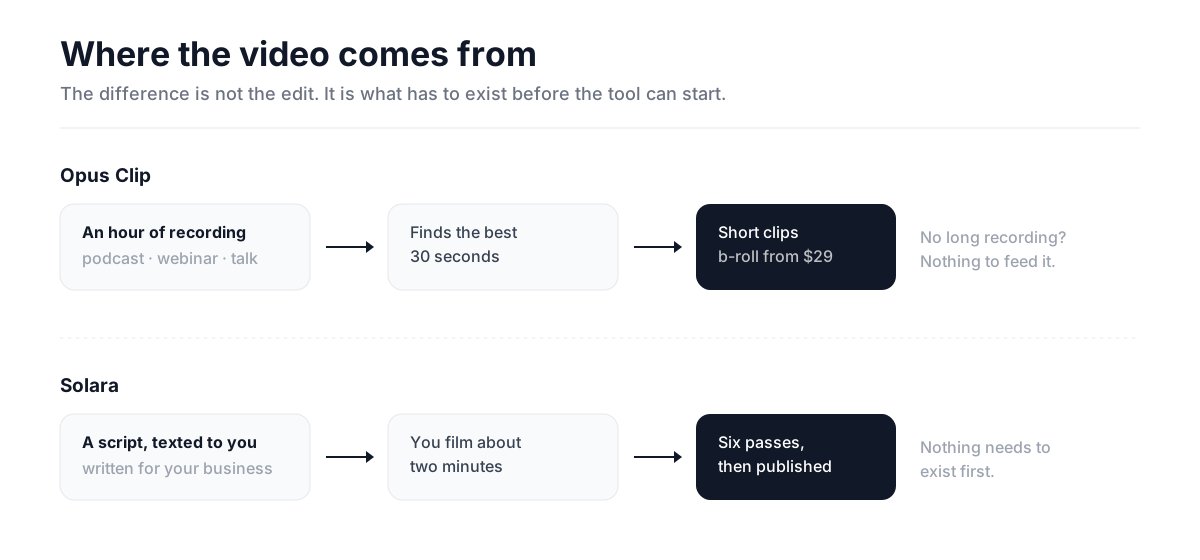
 Opus Clip is very good at one thing and it is worth saying so first: it finds the strongest thirty seconds inside a sixty-minute recording, and nothing else in the category does that as well. The catch is structural rather than a matter of degree. It needs a long recording that already exists — and a plumber, a salon or a clinic does not have one. Not less of one. None.
Every figure below was read off Opus Clip’s own pricing page on 28 September 2026. This page is published by Solara, so check the numbers — they are all theirs.
What each tier buys
| Plan | Monthly | What arrives at this tier |
|---|---|---|
| Free9:16 only · 1080p · media expires after 3 days | $0 | Basic clipping from spoken words, auto hook, emoji highlights. Exports are not watermark-free and there is no posting. |
| Starter30-day export window · highest resolution | $15 | Watermark-free exports, animated captions, AI voice-over, speech cleanup, text overlays, posting to three platforms. |
| Pro100GB storage · 9:16, 1:1 and 16:9 | $29 | AI video b-roll, sound effects, music, dubbing, transitions, intro and outro cards, four brand templates, scheduling to six platforms. |
The question that decides it
Not price, and not features. Ask this: do you produce an hour of recorded content a month already?
If yes — you run a podcast, you speak at things, you record your webinars — Opus Clip is probably the best $15 in this category and you should stop reading. If no, every feature on its pricing page is downstream of a thing you do not have, and the subscription will sit unused by the third month. Repurposing tools cannot help someone with nothing to repurpose.
Side by side
| Opus Clip | Solara | |
|---|---|---|
| Where the video comes from | A long recording you already have — podcast, webinar, recorded talk, YouTube upload. | A script written for your business, texted to you. You film about two minutes. |
| Finding the good moment | Best in the category. Scores segments for virality and reframes them vertical. | Not applicable — the script is already the good moment, written to be one. |
| B-roll, music, sound effects | None below Pro, $29. | Included on every video at $29. |
| Full-screen animated moments | Not offered at any tier. | One of the six passes on every video. |
| The free plan | Real, but exports are not watermark-free and stored media is deleted after three days. | No free plan. A one-off pack of three edited videos instead. |
| Publishing | Posts to three platforms on Starter, schedules to six on Pro. | Publishes to Instagram, Facebook and TikTok on a schedule, with you approving each post. |
What Solara costs
$29 a month. It writes the script for your business, texts you when to film, then runs all six production passes and publishes to Instagram, Facebook and TikTok. There is nothing to repurpose because it makes the thing in the first place.
There is a one-off $150 pack of three fully edited videos if you want to see the edit first, and a managed plan at $299 a month where a team does the whole thing.
Common questions
- What is the best Opus Clip alternative?
- For the same job — cutting long recordings into shorts — Vizard and Klap are the closest substitutes, and Descript is better if you want to edit by transcript. If you are looking because you have no long video to cut up, none of those solve it: they all need source material. Solara creates the source material, by writing a script for your business and prompting you to film about two minutes.
- How much does Opus Clip cost in 2026?
- As of 28 September 2026, Opus Clip has a free plan, Starter at $15 a month and Pro at $29 a month, with Business priced on request. The free plan does not offer watermark-free exports and deletes stored media after three days. B-roll, music, sound effects, dubbing and brand templates begin at Pro.
- Can I use Opus Clip without a long video?
- Not really. Opus Clip is a repurposing engine — it finds the strongest segments inside a longer recording, so it needs one to work from. If you film short clips directly, you are paying for segment-selection you will not use. That is the main reason it fits creators and podcasters far better than it fits owner-operated businesses.
- Is Opus Clip worth it?
- If you publish long-form regularly — a podcast, webinars, recorded talks — it is excellent and probably the best value in the category at $15. If you do not, it solves a problem you do not have, and the subscription tends to go unused within a couple of months.
- Does Opus Clip post to social media?
- Yes. The $15 Starter plan posts to YouTube, TikTok and Instagram, and the $29 Pro plan schedules to six platforms. The free plan has no posting at all.
Sources
Every figure on this page was read from the vendor’s own page on 28 September 2026. Nothing here is inherited from another comparison article.
- 1.Opus Clip pricingOpus Clip
Opus Clip’s prices, plan contents, export and storage limits and publishing capabilities were read from opus.pro on 28 September 2026. Competitor pricing moves quickly — check the current page before relying on any figure here. Opus Clip is a trademark of its owner; this comparison is published by Solara and is not affiliated with or endorsed by Opus Clip.