Comparison · prices read 28 September 2026
A Captions AI alternative, compared honestly
 By Yuval StruttiFounder, Solara AICompetitor prices checked
 Captions is a good editor and the closest thing on the market to what Solara does. It is the only rival with a real teleprompter, so it helps with the hard part — knowing what to say to camera. Two things are worth checking before you subscribe: its price is metered in credits, so a $24.99 plan buys somewhere between 12 and 50 edits, and it does not post the video. It hands you a file.
Every figure below was read off Captions’ own pricing page and help centre on 28 September 2026. This page is published by Solara, so read the comparison table with that in mind — and check the numbers, because they are all theirs, not ours.
What 500 credits actually buys
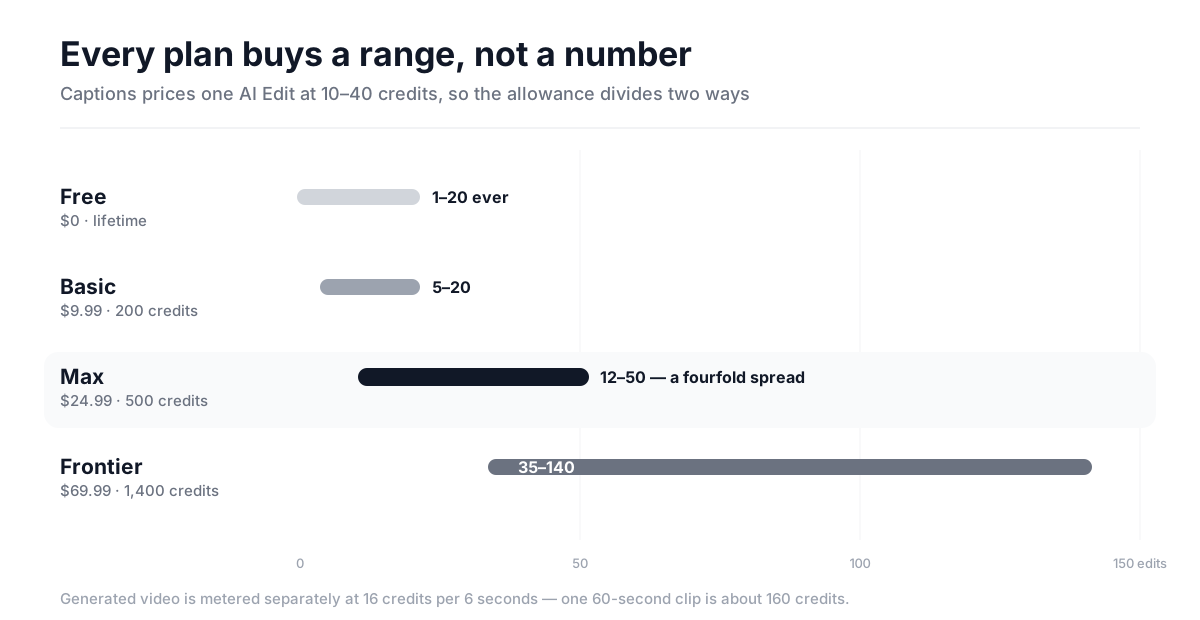
This is the question nobody answers, including Captions. Their help centre prices an AI Edit at 10–40 credits, varying with video length, model and algorithm. That range is the finding. Divide the allowance by each end of it and you get the honest span of what a plan is worth:
| Plan | Price | Credits / mo | Edits / mo |
|---|---|---|---|
| Free | $0 | 60–200 once | 1–20 ever |
| Basicwas Pro | $9.99 | 200 | 5–20 |
| Max | $24.99 | 500 | 12–50 |
| Frontierwas Scale | $69.99 | 1,400 | 35–140 |
| Frontierhigher tier | $139.99 | 2,800 | 70–280 |
| Frontiertop tier | $279.99 | 5,600 | 140–560 |
Generated video is metered separately at 16 credits per 6 seconds, so one 60-second generated clip costs about 160 credits — three of them and a 500-credit month is gone. Credits do roll over, capped at three times your monthly allowance. If you are reading an older comparison, note that Pro was renamed Basic and Scale became Frontier; the prices carried over, the names did not.
The thing Captions does not do
Search for a Captions alternative and you get Submagic, OpusClip, Descript, Vizard, VEED, Kapwing and CapCut. They differ in price and polish, and one of them is probably a better editor for you than Captions is.
Two of them go further than Captions here, and it is worth saying so plainly: Submagic and Opus Clip both publish. Submagic schedules and posts from inside the editor; Opus posts on its $15 plan and schedules to six platforms on its $29 one. Captions does neither — it returns a file and the rest is yours.
What none of them do is decide what you should say this week and ask you for it. They all start from something you already have — footage you shot, or a long video to cut down. If the reason your last video never went up is that editing was hard, any of them fixes it. If the reason is that it was Thursday, you were on a job, and nobody had told you what to film, none of them do.
Captions and Solara, side by side
| Captions | Solara | |
|---|---|---|
| Price shape | Credits. An AI Edit is 10–40 of them; generation is 16 credits per 6 seconds. | Flat. $29 a month, or $150 once for three videos. |
| Knowing your bill in advance | No. The credit cost of an edit is a published range, not a number. | Yes. The price is the price, and nothing meters down as you use it. |
| Help getting the words right | Teleprompter in the iOS and Android apps, with AI pace-matching. Genuinely good. | A script written for your business, texted to you, read off a teleprompter. |
| The edit itself | Cuts, captions, B-roll, music, effects, AI actors and digital twins. | Cuts, captions, sound effects, animation, B-roll and music. Six passes. |
| Publishing it | No. You export a file and post it yourself. | Posts to Instagram, Facebook and TikTok on a schedule, with you approving each one. |
| Someone else doing the work | No. Every tier is self-serve; the top tier is the same product with more credits. | $299 a month, 6-month minimum: a team writes, films the plan, edits and publishes. |
The comparison worth making: $279.99 against $299
Captions’ largest plan is $279.99 a month. It buys 5,600 credits. It does not buy a person — the top tier is the same self-serve product with the meter set higher, so you are still writing, filming, editing and posting every video yourself.
Solara’s managed plan is $299 a month on a 6-month minimum. For nineteen dollars more, a team does the script writing, the creative research, the editing and the publishing strategy. That is the honest comparison at the top of the market, and it is the one no listicle makes.
When to stay with Captions
Stay if you are a creator rather than a business owner, if you edit often enough that per-video cost matters more than predictability, or if you want AI actors and digital twins — Solara does not do those and is not trying to. Stay if you like controlling the edit frame by frame. Their teleprompter was rebuilt in August 2026 and adjusts to your speaking pace, which is a genuinely thoughtful piece of design.
Switch if you run a business rather than a channel. The pattern Solara is built for is the plumber, the salon, the clinic and the solo consultant: people for whom the editor was never the bottleneck, and who need the video to go out on Thursday whether or not they remembered.
What Solara costs
$29 a month. It texts you a script written for your business, you film about two minutes off a teleprompter, and it cuts, captions, scores and publishes to Instagram, Facebook and TikTok, with you approving every post. No credits, no meter.
If you only want the editing tested first, there is a one-off $150 pack of three fully edited videos with no subscription. If you want none of it to touch your calendar, the managed plan is $299 a month.
Common questions
- What is the best Captions AI alternative?
- It depends on which half of the job you need. If you want a different editor, Submagic, OpusClip, Descript and VEED are the credible ones, and CapCut is free. Submagic and Opus Clip also publish, which Captions does not. What none of them do is decide what you should post this week and prompt you to film it — they all start from footage or a long video you already have. Solara writes the script, texts you when to film, edits, and publishes to Instagram, Facebook and TikTok, at $29 a month.
- How much does Captions AI cost in 2026?
- As of 28 September 2026, Captions has a free tier with 60–200 lifetime credits, Basic at $9.99 a month for 200 credits, Max at $24.99 for 500 credits, and Frontier tiers at $69.99, $139.99 and $279.99 for 1,400, 2,800 and 5,600 credits. There is also a $4.99 Lite plan on Android. Unused credits roll over, capped at three times your monthly allowance.
- How many videos can you make with 500 credits on Captions?
- Between 12 and 50 AI Edits, because Captions prices an AI Edit at 10–40 credits depending on video length, model and algorithm. Fully generated video is metered separately at 16 credits per 6 seconds of output, so a 60-second generated clip costs about 160 credits — roughly three of them on a 500-credit plan.
- Is Captions AI worth it?
- It is worth it if you are a creator who edits a lot, wants AI actors or digital twins, and can absorb a variable monthly bill. It is a strong editor with a genuinely good teleprompter. It is a poor fit if you need a predictable cost, or if your real problem is that videos sit unposted on your phone — Captions does not publish to social platforms.
- Does Captions AI post to Instagram or TikTok for you?
- No. Captions is an editor: it returns a finished video file that you then upload and post yourself. Scheduling and publishing to Instagram, Facebook or TikTok are not part of the product as of 28 September 2026.
- Why did Captions rename its plans?
- Captions renamed Pro to Basic and Scale to Frontier. The prices and features carried over unchanged. It matters mainly when reading older comparison articles, which still quote the retired names — and when searching, because a lot of people are still looking up tiers that no longer exist under those labels.
- Is there a free alternative to Captions AI?
- CapCut is the genuine free option and it is good. The trade is time: free tools edit, they do not decide what you should post or put it out on a schedule, so the hours come back somewhere else. Captions' own free tier allows basic trimming, captions and zoom without a watermark, but charges credits the moment you touch an AI feature.
Sources
Every figure on this page was read from the vendor’s own page on 28 September 2026. Nothing here is inherited from another comparison article.
- 1.Captions pricingCaptions
- 2.Understanding credits — Captions Help CenterCaptions
- 3.Subscriptions & plans — Captions Help CenterCaptions
- 4.AI teleprompterCaptions
Captions’ prices, credit allowances, per-action credit costs, rollover cap and plan renames were read from captions.ai/pricing and the Captions help centre on 28 September 2026. Competitor pricing moves quickly and this vendor renamed two tiers within a year — check the current page before relying on any figure here. Captions is a trademark of its owner; this comparison is published by Solara and is not affiliated with or endorsed by Captions.